User Workshop 2026
Getting support
During the workshop:
- Join the OpenEM Slack and ask questions on the
#workshopchannel - Make notes & add feedback to the google doc
After the workshop:
- Subscribe to openem-members@lists.psi.ch
- Ask your facility contact
- Email openem-help@lists.psi.ch for cross-facility requests
Facility Contact Information
| Facility | Contact person | Contact email | Additional Documentation |
|---|---|---|---|
| DCI-L | Florent Wenger | ||
| LBEM | Julika Radecke, Gaël Cartier | ||
| Empa | Despina Adamopoulou | despoina.adamopoulou@empa.ch | |
| ETHZ | Philipp Wissmann | ||
| PSI | Spencer Bliven | scicat-help@lists.psi.ch | Data Catalog documentation |
| UNIBAS | Imre Gonda, Moritz Hunkeler | imre.gonda@unibas.ch, moritz.hunkeler@unibas.ch | |
| UNIBE | David Kalbermatter | david.kalbermatter@unibe.ch | Available on the transfer server |
| UNIGE | Andy Howe | andrew.howe@unige.ch |
Connect to your Facility
We recommend first trying the demo.
| Facility | Ingestor URL | Network |
|---|---|---|
| Demo | Open https://ingestor.qa.psi.ch/ |
Test Internet |
| UNIBAS | Open https://openem.unibas.ch/qa |
Test UNIBAS VPN |
| PSI | Open https://emf-ingestor.psi.ch/qa |
Test PSI VPN |
| DCI-L | Open https://dci-ingestor.unil.ch/qa |
Test |
| LBEM | Open https://em-ingestor.epfl.ch/qa |
Test EPFL VPN |
| ETHZ | Open http://localhost:8888 |
Test OpenEM Access Machine |
| DCI-G | Open https://openem-ingestor.unige.ch/qa |
Test |
| UNIBE | Open https://openem-ingestor.id.unibe.ch/qa |
Test UNIBE VPN |
| EMPA | Open https://openem-ingestor.empa.ch/qa |
Test Empa VPN |
Troubleshooting
I don’t belong to any SciCat groups
Groups should show up in the SciCat user profile (click on your name after logging in). If you are missing a group, contact Spencer Bliven or Carlo Minotti to be added.
I logged in to the ingestor, but it still prompts me to log in again
First try refreshing the ingestor page.
If the button still says ‘Login’ rather than showing your name, try disabling ‘Enhanced Tracking Protection’ (Firefox) or ‘Enhanced Security’ (Chrome) for this site only.
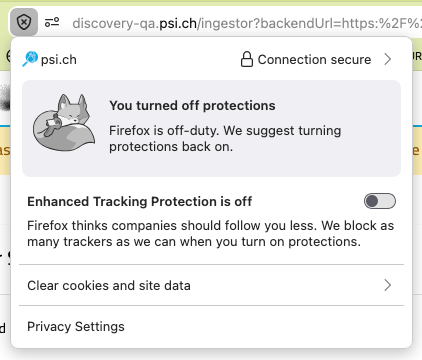
This step should be unnecessary in the future.
I have both a PSI account and eduGAIN
We recommend logging in with your PSI account. P-groups can only be updated if you log in through PSI directly. However, adding an eduGAIN account such as SWITCH eduId can be useful to maintain access if you ever change institutes. You can link a second login method with this link:
Go to Account Security > Linked Accounts and link any additional accounts wanted.